
Colorized google maps block
Categories
Component ID
2451601
Component name
Colorized google maps block
Component type
module
Maintenance status
Development status
Component security advisory coverage
covered
Downloads
5106
Component created
Component changed
Component body
Colorized gmap module allows to add a google map on the site as a drupal block and customize it. At the colorized gmap block creation page you are able to customize a standard google map (e.g. to colorize water, landscape , etc.) You will see changes on the map after every action.
This module is used in the Easy booking distribution project
Features:
- colorize any elements of the map
- hide unnecessary map controls
- change map controls position
- customize marker image, caption and info window
- add multiple blocks
- exportable via 'Features' module
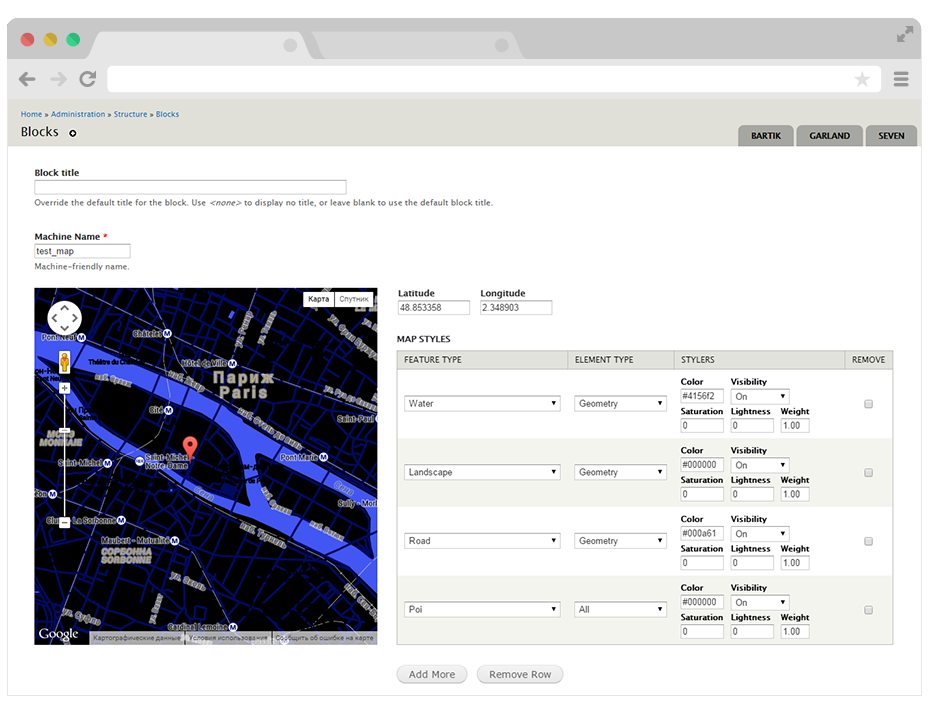
The map is 500x500px by default. But it is very easy to customize sizes via css.
Requirements:
- Libraries API (https://www.drupal.org/project/libraries)
- Entity API (https://www.drupal.org/project/entity)
- Colorpicker library (http://www.eyecon.ro/colorpicker/)
Installation and usage:
- Download and install Libraries and Entity modules.
- Download the colorpicker library into your site's sites/all/libraries/colorpicker directory.
- Download and install this module.
- Go to 'admin/structure/block/colorized_gmap_block' to create colorized gmap block.
Created by ADCI solutions team