Password Strength

Component type

module

Categories

Maintenance status

Development status

Downloads

19560

Component created

Component changed

Password Strength module provides realistic password strength measurement and server-side enforcement for Drupal sites using pattern-matching and entropy calculation. Almost any type of password can be allowed so long as the password proves to be of high enough entropy. For inspiration see the XKCD comic on password strength.

LDAP provisioning

Component type

module

Categories

Maintenance status

Development status

Downloads

10751

Component created

Component changed

LDAP provisioning module provides a user registration process with an optional account approval queue in Drupal and creates user accounts in both LDAP server and Drupal.

It depends on the ldapauth module in the http://drupal.org/project/ldap_integration package.

This project is being developed by Miglius Alaburda.

Developed by OpenBand, an M.C. Dean, Inc. company.

Ext

Component type

module

Maintenance status

Development status

Downloads

5046

Component created

Component changed

Ext JS is a powerful Javascript application framework, allowing rich GUI widgets to be added to your site. It supports grid, tree, chart widgets, just to name a few. If you are thinking of upgrading your Drupal page beyond what JQuery can offer, Ext JS is worth having a look. For more information, you can check out what Ext JS can achieve through over 100 demo examples here.

The main purpose of this module is to act as a bridge between Drupal entities and Ext JS code. It exposes the Drupal entities through several REST interfaces for your Ext JS page to interact with your Drupal setup. For a Drupal developer, the module can help you to leverage on the powerful Ext JS UI widget to present your data nicely at the client side interface. On the other hand, for an Ext JS developer, this module can help you to adopt Drupal as a server side framework and leverage on its goodness, for example, in managing data and defining user roles and content access permission.

In short, the functions provided by this module include:

  • Automatic Generation of Model-View-Controller (MVC) file structure . Explanation of Ext JS MVC structure can be found here
  • Allow generation of Ext Javascript Store and Model for each Drupal Entity type.
  • Exposing the store and model data through REST interface as JSON format.
  • Loading of Ext Page in /Ext/Page.

By itself, this module can achieve a little, and you will need to build an external module to define some of interfaces in Ext JS code. A simple example has been provided in this module to demonstrate how this can be done. If you are not familiar with Ext JS, you can go through some of the tutorials here before attempting to modify the Ext Javascript code within the example.

Note: A new version of this module is being developed to provide relatively comprehensive integration functions with Ext 4.x (currently 4.1). For details please see http://drupal.org/node/1316616 . The 6.x-2.x-dev and 7.x-2.x-dev downloads provide the latest development snapshots. Update: the MVC portion of the new module is largely complete and is pretty stable (and probably very useful for developers implementing an application based on a Drupal backend and Ext JS UI). Have a look here to see what has been implemented.

Wysiwyg

Component type

module

Maintenance status

Development status

Downloads

3187172

Component created

Component changed

Allows the use of client-side editors to edit content. It simplifies the installation and integration of the editor of your choice. This module replaces all other editor integration modules. No other Drupal module is required.

Answers

Component type

module

Maintenance status

Development status

Downloads

43888

Component created

Component changed

Overview

Answers enables the implementation of a Question & Answer system in a Drupal site. Users can post questions and other users can answer them. To see it at work (based on the most recent 7.x-4.x-dev version), head over to its Demo site and have a look at the Questions there.

link node

Component type

module

Categories

Maintenance status

Development status

Downloads

14503

Component created

Component changed

Once installed (see README in the archive) you (or any user who can post) can add an embedded href link to any node using the syntax (where N is a number, and NNN is a node id):

[node:NNN]

Parameters follow the part and are comma separated name="value" pairs:

[node:NNN,title="Original version of the picture"]

Edit term

Component type

module

Maintenance status

Development status

Downloads

9012

Component created

Component changed

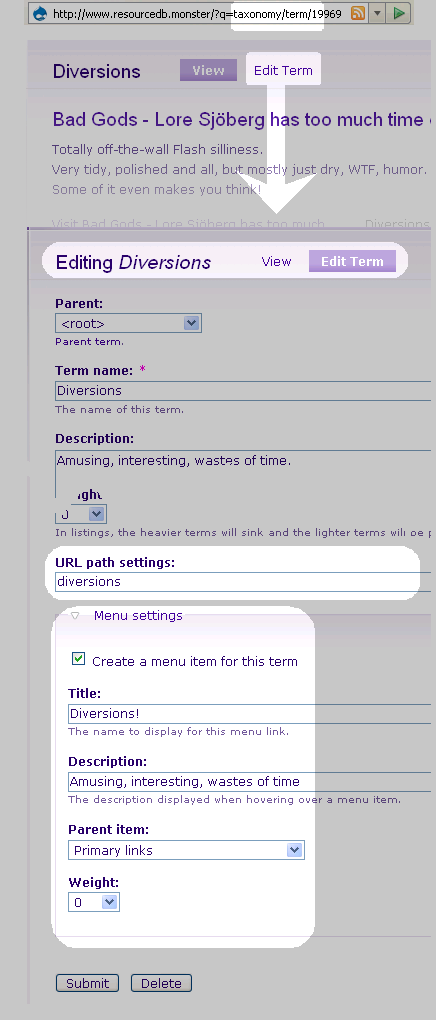
Edit term provides links on taxonomy listing pages to directly edit taxonomy terms.

This makes it easier to immediately edit term name, synonyms, description, and weight for the term you are viewing without navigating through your site's administrative back end.

On the term edit page, you also have the new ability to set an URL-alias for the term directly, and create and position a menu item - the same way as can be done for nodes. See illustration.

Once changes are made, you are returned to the listing page from which you started, cutting normal term management procedure down from a dozen clicks to just two.

Update Notifications Disable

Component type

module

Maintenance status

Development status

Downloads

27709

Component created

Component changed

This module has exactly a few use cases:
a) The paranoid, tinfoil hat people who don't want Drupal.org to have any information about the modules installed on their sites, even at the expense of their sites being secure.
b) Large organizations with their own Drupal distribution who want to handle the flow of update notifications.
c) Organizations who use a third party administration service which manages updates for them
d) Distributions whom need to control how updates are created.

If you do not fall under these use cases, you probably should not use this module. It will prevent core's Update status module from being enabled, by design. Please see http://drupal.org/node/282919#comment-1074620 for more details.

Vocabulary Index

Component type

module

Maintenance status

Development status

Downloads

21349

Component created

Component changed

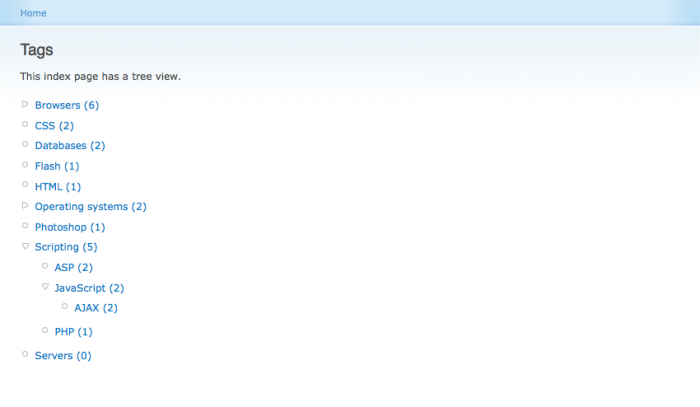
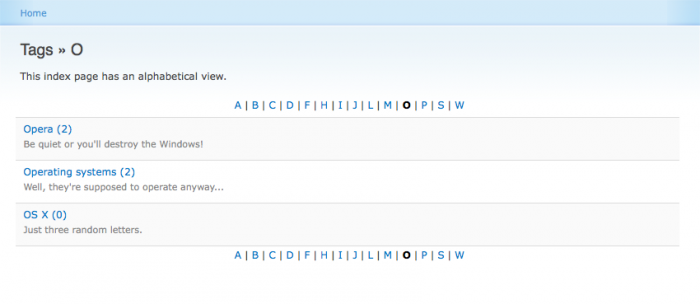
Vocabulary Index provides an easy way to create a taxonomy browser / directory index. You can choose for which vocabularies to create pages or blocks where the terms within that vocabulary are listed. With just a few clicks you're done. Listing is possible in different kind of views depending on your needs:

Example screenshot of a tree view. The tree view displays all terms in a nested tree. If visitors of your site have JavaScript enabled, parent terms will be collapsed by default, but they will expand when clicked on. Since tree view displays all terms on a single page, terms with multiple parents are displayed more than once: once beneath every parent.
Example screenshot of a browsable view. The browsable view lets visitors browse a vocabulary much like they would browse through directories on their hard drive. Taxonomy pages of parent terms do not list the nodes within those terms, but the child terms it contains. Since blocks cannot span multiple pages, they can be displayed using a flat view. This is exactly the same as the browsable view apart from that it is not browsable. Browsable index pages are pageable.
Example screenshot of an alphabetical view. The alphabetical view sorts terms by first letter. Optionally character transliteration may be enabled. Alphabetically viewed index pages are pageable.