Edit term

Component type

module

Maintenance status

Development status

Downloads

9012

Component created

Component changed

Edit term provides links on taxonomy listing pages to directly edit taxonomy terms.

This makes it easier to immediately edit term name, synonyms, description, and weight for the term you are viewing without navigating through your site's administrative back end.

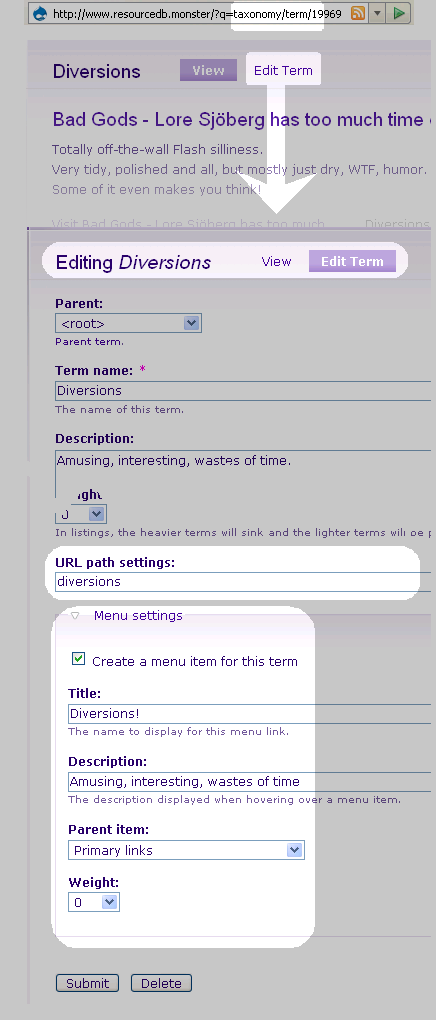
On the term edit page, you also have the new ability to set an URL-alias for the term directly, and create and position a menu item - the same way as can be done for nodes. See illustration.

Once changes are made, you are returned to the listing page from which you started, cutting normal term management procedure down from a dozen clicks to just two.

Vocabulary Index

Component type

module

Maintenance status

Development status

Downloads

21349

Component created

Component changed

Vocabulary Index provides an easy way to create a taxonomy browser / directory index. You can choose for which vocabularies to create pages or blocks where the terms within that vocabulary are listed. With just a few clicks you're done. Listing is possible in different kind of views depending on your needs:

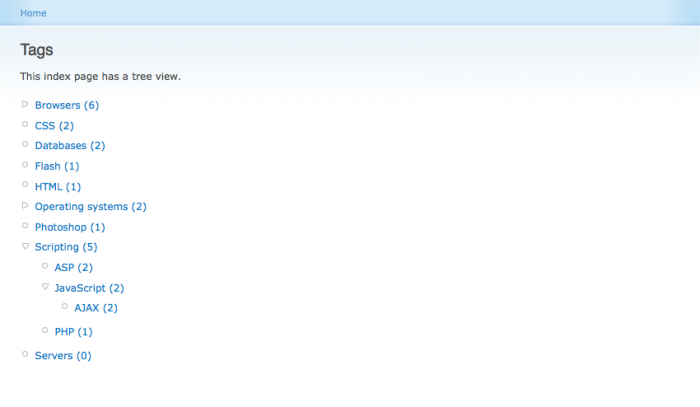
Example screenshot of a tree view. The tree view displays all terms in a nested tree. If visitors of your site have JavaScript enabled, parent terms will be collapsed by default, but they will expand when clicked on. Since tree view displays all terms on a single page, terms with multiple parents are displayed more than once: once beneath every parent.
Example screenshot of a browsable view. The browsable view lets visitors browse a vocabulary much like they would browse through directories on their hard drive. Taxonomy pages of parent terms do not list the nodes within those terms, but the child terms it contains. Since blocks cannot span multiple pages, they can be displayed using a flat view. This is exactly the same as the browsable view apart from that it is not browsable. Browsable index pages are pageable.
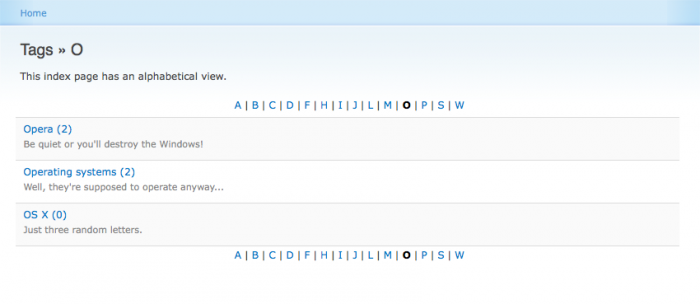
Example screenshot of an alphabetical view. The alphabetical view sorts terms by first letter. Optionally character transliteration may be enabled. Alphabetically viewed index pages are pageable.

Bing search

Component type

module

Maintenance status

Development status

Downloads

4198

Component created

Component changed

Provides a search tab which pulls results from the Bing web service. The search query can be limited to a set of sites, and various advanced search query strings can be used (or appended to all search queries).

The 2.x branches of this module support the Bing API 2.x; the 1.x branches support the original Live Search API 1.x.

Project issue file test

Component type

module

Categories

Maintenance status

Development status

Downloads

5184

Component created

Component changed

For background and to file new issues, please use the DrupalCI queue. We'll move it to other modules as necessary.

This is the module that takes patches posted in the Drupal.org issue queue and sends them off to dispatcher.drupalci for dispatch to aws testbots.

Taxonomy CSV import/export

Component type

module

Maintenance status

Development status

Downloads

253332

Component created

Component changed

This module allows you to import or export taxonomy from or to a CSV (comma-separated values) file or with a copy-and-paste text.

It helps you to quick import a non-standardized vocabulary, for example an old thesaurus, a hierarchical taxonomy or a simple list of children, synonyms, descriptions, weights or related terms to terms. It can be used as a module or as an API with a plug-in mechanism. It can manage internationalized vocabularies with i18n_taxonomy, a submodule of i18n module [Drupal 7 only].

Taxonomy CSV supports drush: you can import/export taxonomies from the command line interface with drush taxocsv-import and drush taxocsv-export.

More informations on Taxonomy CSV import/export are available on the help page in English (7.x version), in English (6.x version) or in French (6.x version). A quick demo is available here, in Dutch.

Drupal.org customizations

Component type

module

Maintenance status

Development status

Downloads

2136

Component created

Component changed

Customizations used on Drupal.org itself. It is not meant to be useful to other sites, except as an educational example of the kinds of modifications you can make via a site-specific module.

More information about the state of planned work on Drupal.org can be found on the Drupal.org Roadmap.

Header image

Component type

module

Maintenance status

Development status

Downloads

84576

Component created

Component changed

This module allows you to display an image on selected pages. If you want one image on the frontpage, another on all FAQ pages and yet another on the about us and contact pages, this is the module that can do it.

Each image, included in a node, can be shown on pages based on node id, path, taxonomy, node type, book or PHP code. A single block is used to display different images (nodes) each image having its own conditions. Using a weight per node the order of selection can be controlled. Multiple header image blocks can be defined.

Spoiler

Component type

module

Maintenance status

Development status

Downloads

8192

Component created

Component changed

This module allows users to hide potential "spoiler" content by inserting them between [spoiler][/spoiler] tags. These tags will be converted to HTML by this filter. If JavaScript is available, then a button will be presented to the user which can be clicked to display the content. If JavaScript is unavailable, then the relevant CSS rules will set the foreground and background colours to the same value, thereby rendering the text invisible, until highlighted.

The Drupal 7 version also provides a wysiwyg editor button.