
Multisite Redirect
Categories
Component ID
Component name
Component type
Maintenance status
Development status
Component security advisory coverage
Downloads
Component created
Component changed
Component body
Multisite Redirect is a system designed to allow users to create and manage URL redirects across domains in a sort of multisite configuration. The primary use case for this module is one where a client might have multiple domains that are being consolidated into a single site. In this scenario not only will the domains be different, but the URLs associated with them as well. Rather than killing all of the obsolete URLs from an old domain, you can drive all of the SEO juice to the primary site. With this module you can define rules that will redirect certain patterns of URLs on certain sites to be redirected somewhere else.
Requirements
Installation
- Download module and copy multisite_redirect folder to sites/all/modules
- Enable the Multisite Redirect modules.
Configuration
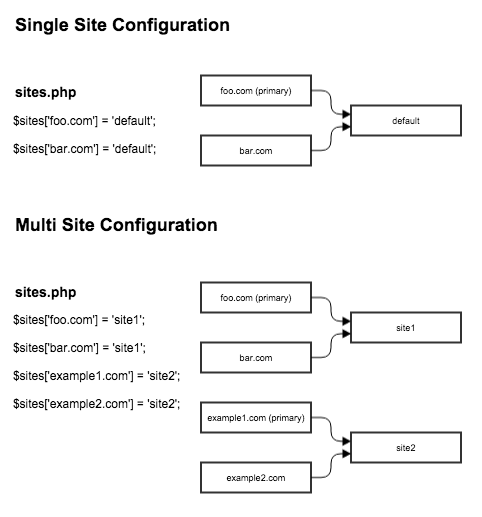
After enabling the module, you'll need to setup your sites/sites.php file by routing all of the domains that are to be managed by this module, to the primary site. In many cases this may just be "default" if you don't intend to run a true multisite setup. Get more information on how to setup your sites.php file.
Configure the primary site and any exclusions that you may have. Exclusions are domains where you want redirect rules to be disabled.
Setup your redirect rules.
Redirect Rules
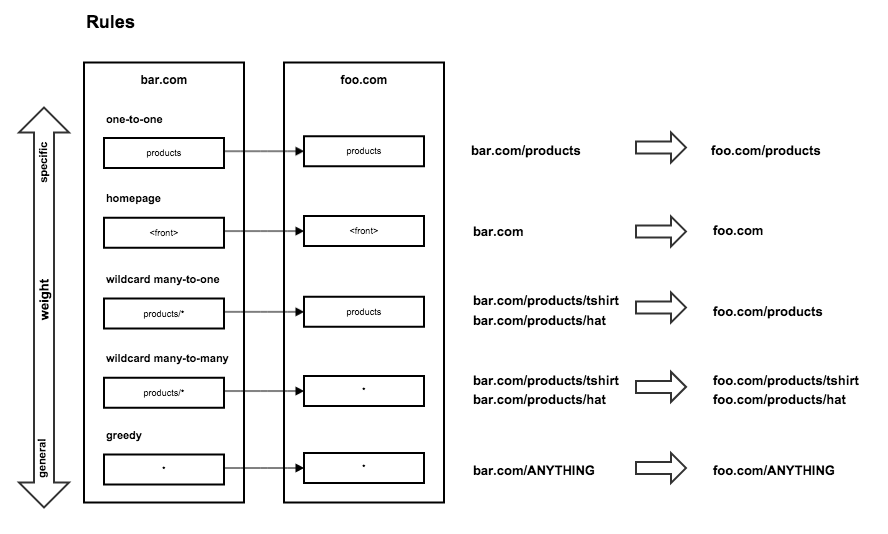
The concept behind this module is to create "rules" or pattern based redirects to consolidate links from one domain to another. When a page is visited, this module will parse through the list of redirect rules and the first rule pattern that matches the visitors source path will fire. You'll probably want to weight the rules from more specific to more general otherwise the more specific patterns may not fire correctly.
Here are some examples of the the different types of rules you may setup.
One-to-one
One-to-one rules are the most specific and simplest types of rules. These are a very literal and will handle redirects from a specific source path to a specific destination on the primary domain.
products --> products<front> --> <front>
Many-to-one
Many-to-one rules will funnel many source paths matching a pattern into a specific destination.
products/* --> products
Many-to-many
Many-to-many rules will match a pattern of source paths and will redirect visitors to the matching path on the destination site. Wildcards in the destination path represent the entire source path and should be used as such. For example, attempting to redirect the user from products/* to store/product/* will not work as expected.
products/* --> *
Greedy
Greedy rules are the most general type of rules and should always be last in the rule list. Using a wildcard in the source path in this way will match against any path on the source site.
* --> *
Sponsorship

This module is sponsored and developed by LevelTen Interactive. LevelTen is a full service interactive agency focused on building online brands by integrating digital strategy, Drupal development and internet marketing. Feel free to connect with us on Twitter and Facebook
If you would like to learn how to build smarter marketing websites with Drupal, checkout the Drupal Site Success! ebook 